If you can take it, you can make it. ——《坚不可摧》
敢于实践,方能实现。
PS: 本文仅供学习参考、仅供学习参考、仅供学习参考,不得用于商业用途。
整体思路

首先使用requests从手机端网页获取公司的ID,然后请求Fiddler 4 抓取到的小程序API接口,最后持久化储存至CSV文件。
配置
Fiddler 4 配置
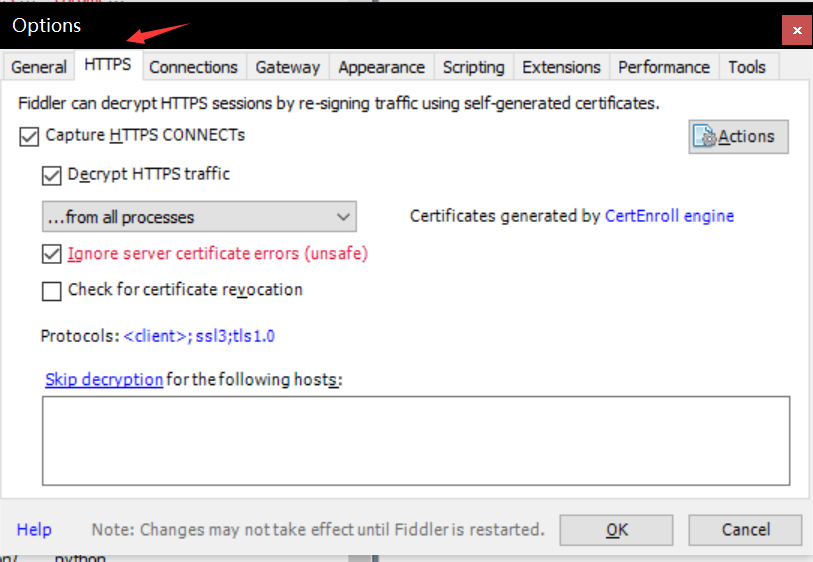
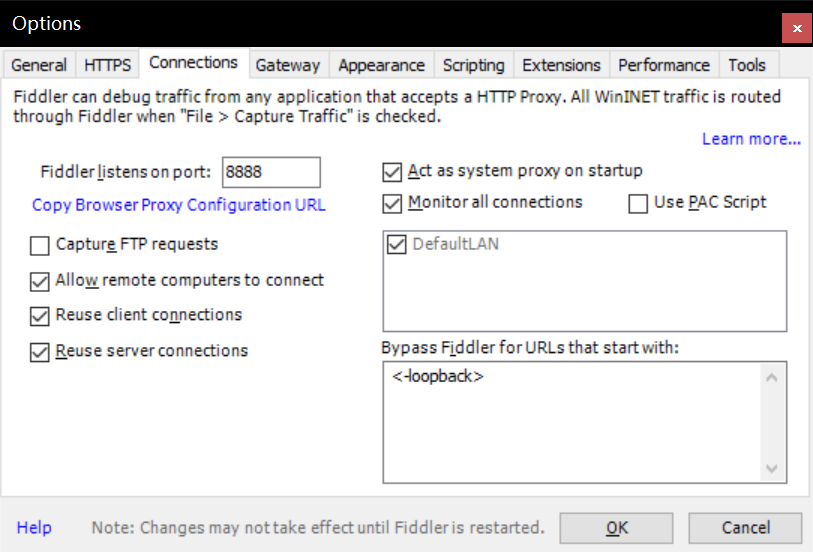
打开Fiddler 4 ,找到上方 Tools 并点击,选择Options,按照下图勾选设置。
IOS 配置
请先确保手机与电脑在同一局域网下。查看windows的IP地址,Win + R,输入cmd进入命令行窗口,输入以下命令:
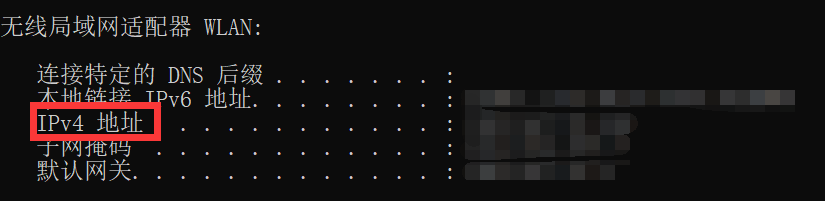
因为我连接的是WiFi,所以直接查看IPv4地址即可。
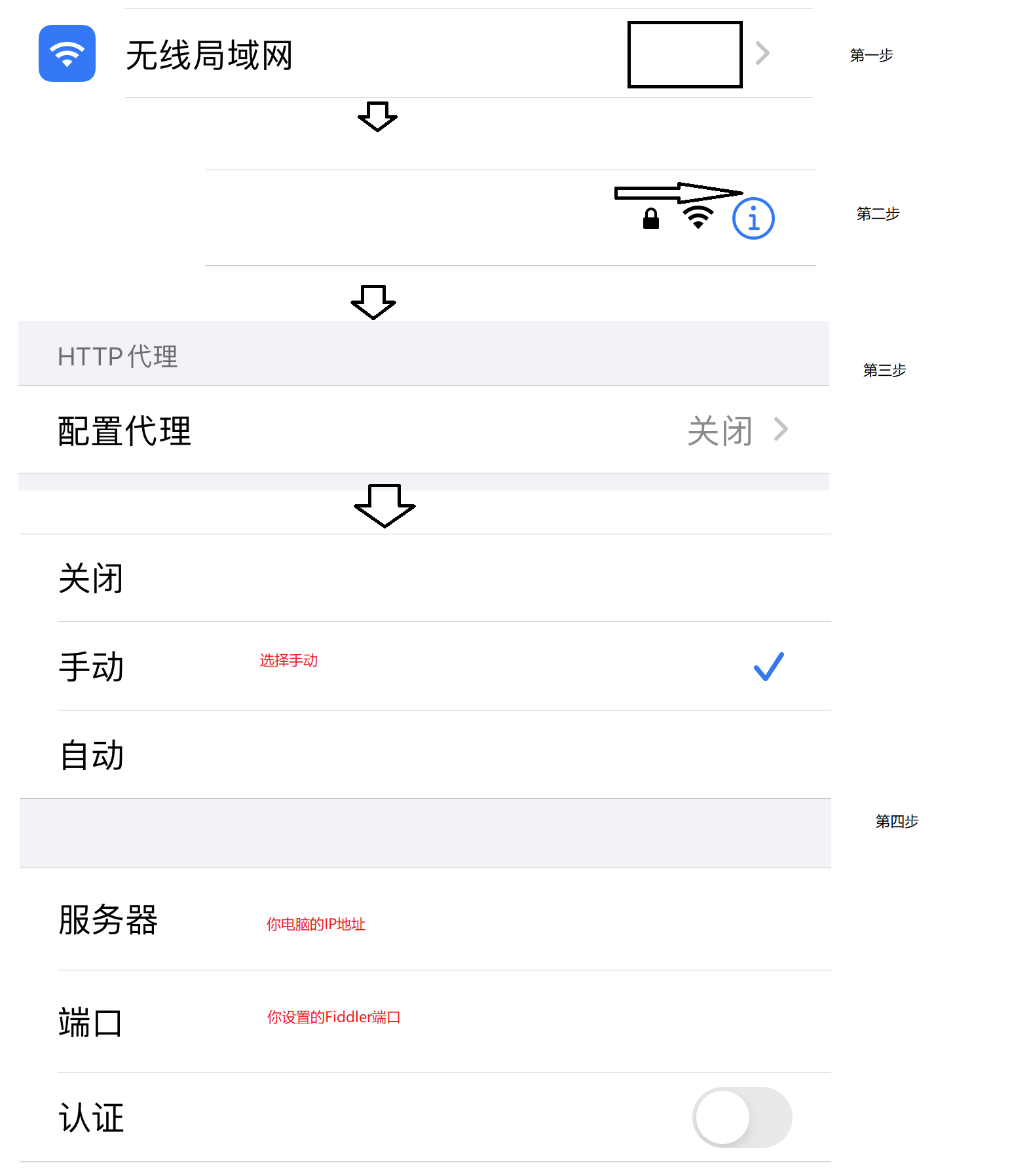
设置手机代理:打开设置 --> 选择无线局域网 --> 点击你所连接WiFi的蓝色区域 --> 滑到底部,点击配置代理 --> 选择手动,按照下图输入你的IP地址以及端口号 --> 点击右上角储存。
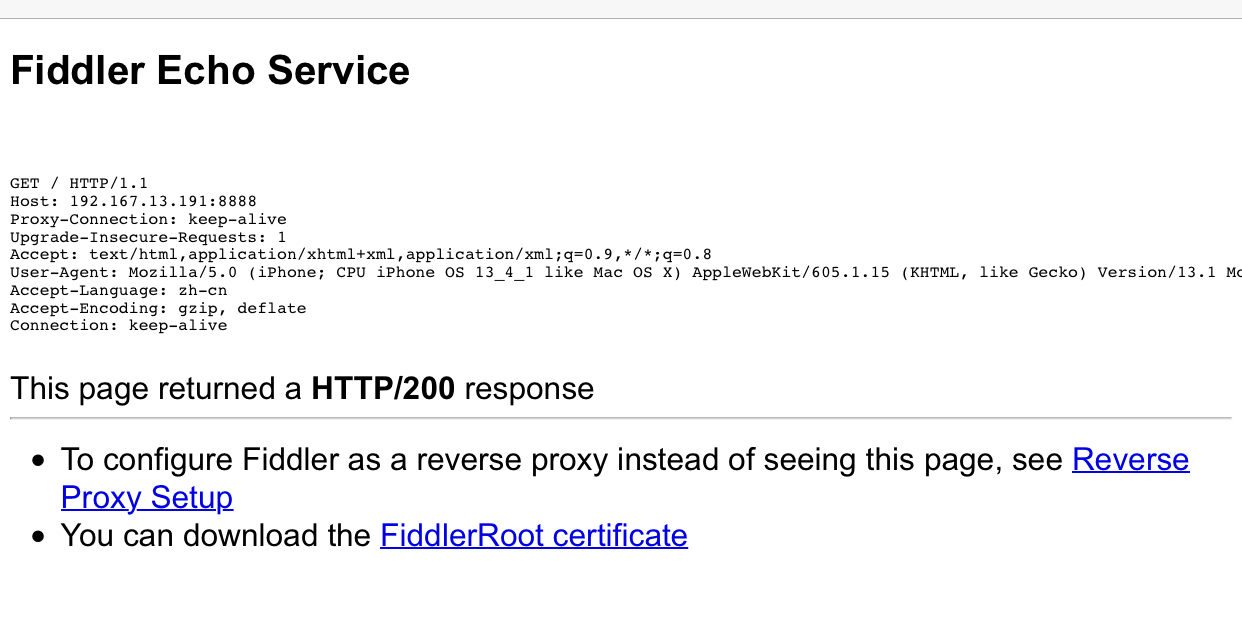
打开iPhone的Safari浏览器,输入你电脑的IP地址:端口号,格式为IP:Port,加入你的IP地址为127.0.0.1,端口号为8888,那么你就在你的浏览器输入:
进入证书下载页面,点击底部的FiddlerRoot certificate
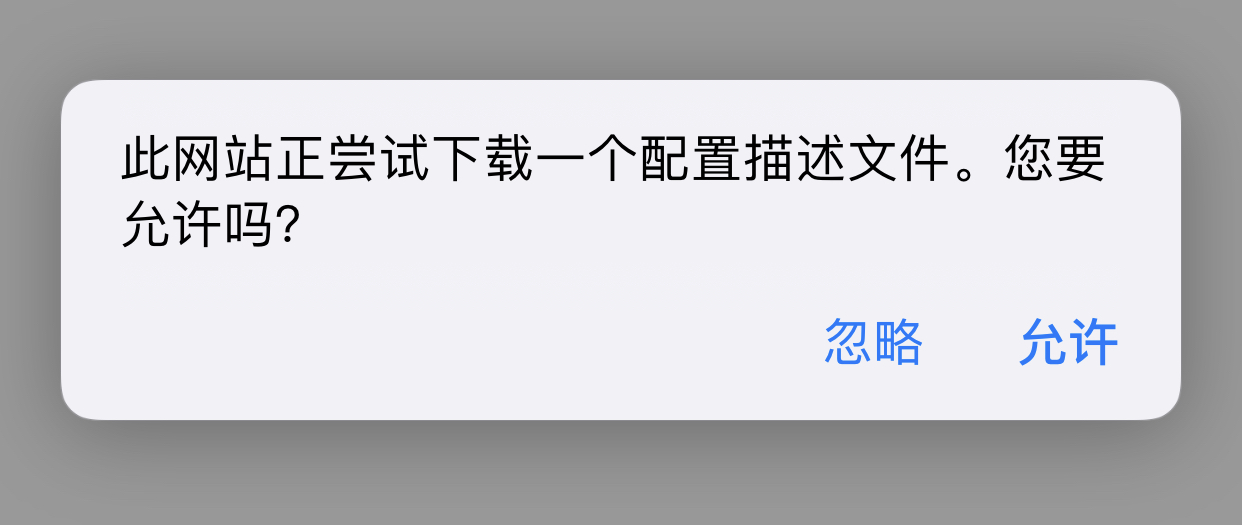
点击允许
安装证书:
1.打开设置 --> 通用 --> 描述文件
2.点击刚下载的描述文件 --> 点击右上角安装 --> 输入密码安装 --> 点击右上角完成
3.返回通用窗口 --> 点击关于本机 --> 滑到底部,选择证书信任设置 --> 开启对我们刚安装完成证书的信任
在手机端输入 baidu.com ,观察Fiddler 4,发现已经有了这条记录。

获取API接口
完成上面配置后,打开微信天眼查小程序(请先确保已经登录),在搜索框输入京东,我们选择 北京京东世纪贸易有限公司这一条,往下滑,点击企业背景区域的工商信息。回到Fiddler查看,点击Body最大的那一条:
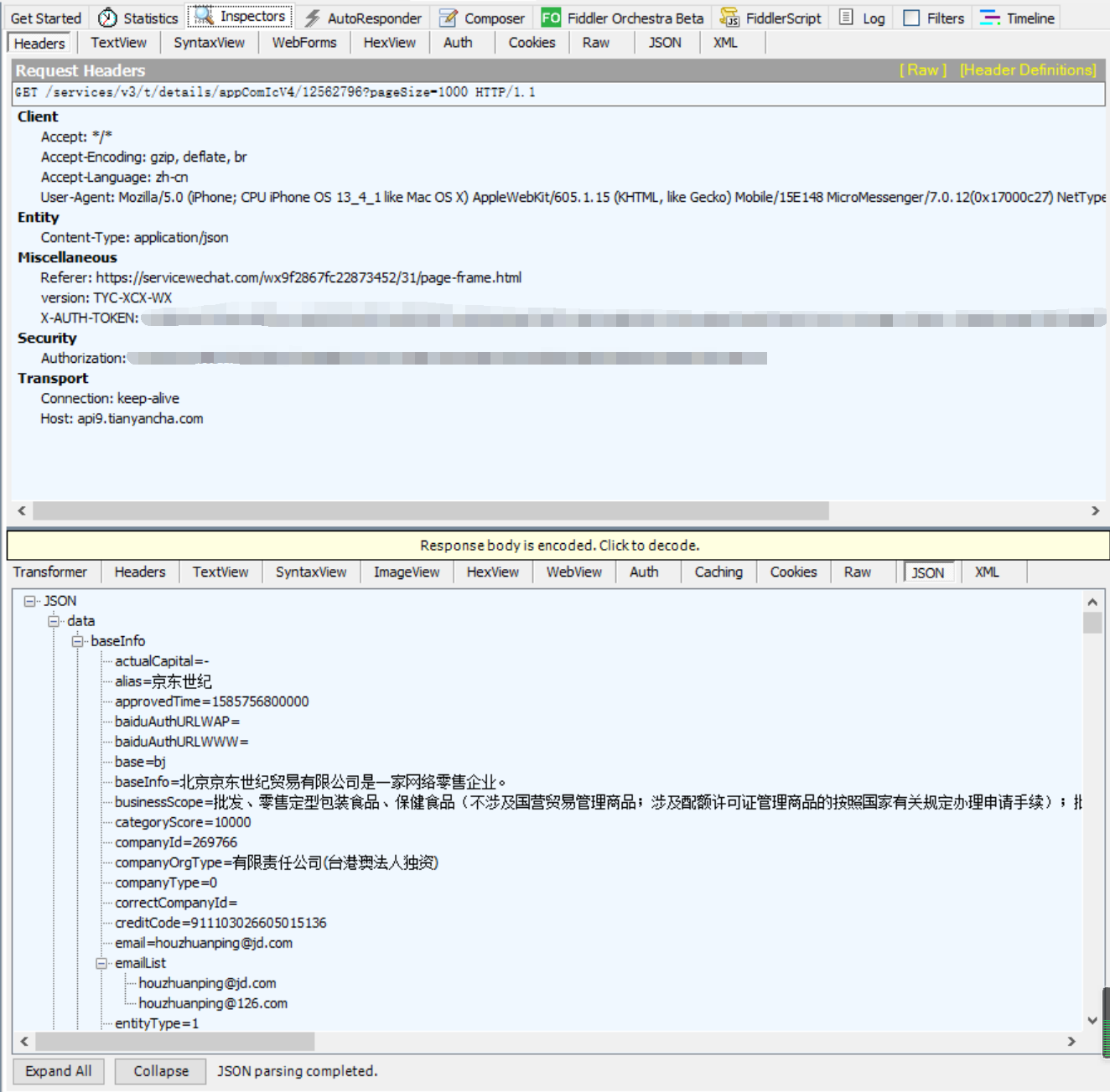
很明显,这就是我们需要的。在上半部分请求头中的 X-AUTH-TOKEN 以及 Authorization是必须的,如果没有这两个参数,我们接下来的请求会被重定向到别的页面,我们的行为被认定为非人类了。如下图:

代码实现
1
2
3
4
5
6
7
8
9
10
11
12
13
14
15
16
17
18
19
20
21
22
23
24
25
26
27
28
29
30
31
32
33
34
35
36
37
38
39
40
41
42
43
44
45
46
47
48
49
50
51
52
53
54
55
56
57
58
59
60
61
62
63
64
65
66
67
68
69
70
71
72
73
74
75
76
77
78
79
80
81
82
83
84
85
86
87
88
89
90
91
92
|
import csv
import time
import random
import urllib3
import requests
from lxml import etree
from fake_useragent import UserAgent
urllib3.disable_warnings()
def get_company_id(page_url):
headers = {
"User-Agent": UserAgent(verify_ssl=False).random,
"Connection": "close",
"cookie": ""
}
html = requests.get(page_url, headers=headers, verify=False).text
tree = etree.HTML(html)
all_company_id = tree.xpath('//*[@id="search"]/div[2]/div/div/div[2]/div[1]/a/@href')
for company_id in all_company_id:
company_id = company_id.split('/')[-1]
pares_company_info(company_id)
time.sleep(1)
def pares_company_info(company_id):
api_url = f'https://api9.tianyancha.com/services/v3/t/details/appComIcV4/{company_id}?pageSize=1000'
headers = {
"User-Agent": "Mozilla/5.0 (iPhone; CPU iPhone OS 13_4_1 like Mac OS X) AppleWebKit/605.1.15 (KHTML, like Gecko) Mobile/15E148 MicroMessenger/7.0.12(0x17000c27) NetType/WIFI Language/zh_CN",
"Host": "api9.tianyancha.com",
"Content-Type": "application/json",
"X-AUTH-TOKEN": "",
"Accept-Encoding": "gzip, deflate, br",
"Connection": "keep-alive",
"Accept": "*/*",
"version": "TYC-XCX-WX",
"Referer": "https://servicewechat.com/wx9f2867fc22873452/31/page-frame.html",
"Authorization": "",
"Accept-Language": "zh-cn"
}
json_str = requests.get(api_url, headers=headers, verify=False).json()
item = json_str.get('data')['baseInfo']
try:
name = item.get('name')
legalPersonName = item.get('legalPersonName')
regStatus = item.get('regStatus')
regCapital = item.get('regCapital')
regLocation = item.get('regLocation')
companyOrgType = item.get('companyOrgType', ' ')
businessScope = item.get('businessScope', ' ')
company_info = {
"name": name, "legalPersonName": legalPersonName, "regStatus": regStatus,
"regCapital": regCapital, "regLocation": regLocation, "companyOrgType": companyOrgType,
"businessScope": businessScope
}
print(company_info)
save_to_csv(filename, company_info)
except:
with open('error_id.txt', 'a') as f:
f.write(company_id + '\n')
def save_to_csv(filename, company_info):
with open(filename, 'a', encoding='utf-8', newline='') as f:
fieldnames = ["name", "legalPersonName", "regStatus", "regCapital",
"regLocation", "companyOrgType", "businessScope"]
writer = csv.DictWriter(f, fieldnames=fieldnames)
writer.writerow(company_info)
if __name__ == "__main__":
filename = 'company_info.csv'
with open(filename, 'a', encoding='utf-8', newline='') as f:
fieldnames = ["name", "legalPersonName", "regStatus", "regCapital",
"regLocation", "companyOrgType", "businessScope"]
writer = csv.DictWriter(f, fieldnames=fieldnames)
writer.writeheader()
base_url = 'https://m.tianyancha.com/top/companies/p{}'
for page in range(1, 11):
print(f'正在爬取第{page}页。。。')
url = base_url.format(page)
get_company_id(url)
time.sleep(random.uniform(15, 20))
|
从手机端网页获取所有公司ID这个函数需要填入你的cookie。获取方式:使用Chrome打开天眼查,登录之后,按F12打开检查,切换到手机模式,然后刷新一下页面,就可以提取到cookie了,要选择 m.开头链接的cookie。 在解析API获取公司信息函数 header中的X-AUTH-TOKEN 以及 Authorization填入你用Fiddler获取到的值。就可以了。
爬取效果

写在最后
如果PC端网页反爬虫不容易解决,手机端网页也不容易解决。那么就可以考虑小程序的接口或APP的接口。还有就是爬虫要休息,只要我爬的足够慢,你就搞不懂我是人类还是非人类了。
PS: 本文仅供学习参考、仅供学习参考、仅供学习参考,不得用于商业用途。